We Design, Develop and Manufacture our Products in Silicon Valley, USA.
Niagara Networks™ delivers all the essential building blocks for high-performance visibility across physical and virtual network infrastructures. Our comprehensive portfolio includes Network Packet Brokers, Bypass Switches, Network TAPs, and a unified orchestration layer for seamless visibility and control.
Advanced Network Packet Brokers
Network Packet Broker Aggregators
Niagara Networks™ solutions enable NetOps and SecOps teams easily and efficiently operate and administer multiple security platforms and service scale, while reducing operational expenses and downtime.
Niagara Networks™ partners with world-class technology leaders to provide high performance network visibility and security.
Our partners include companies that are part of our technology alliance and companies who take part in distributing Niagara's solutions.
Expanding reach and value through a strong
worldwide network of channel partners
Empowering innovation through strategic
alliances with leading technology providers
A network TAP gives security and monitoring tools a reliable copy of the traffic crossing a physical link. Unlike a SPAN port or port mirror, a TAP is dedicated to traffic access. It is designed to capture packets continuously, preserve visibility during high utilization, and support the security tools that depend on full packet data.
Niagara Networks provides network TAP solutions for copper, fiber, optical, passive, active, bypass, and hybrid deployments from 1G through high-speed data center environments. Whether you are instrumenting a new build, replacing SPAN-based monitoring, protecting inline security tools, or expanding packet visibility across a data center, Niagara can help you choose the right TAP architecture.
Capture every packet with passive, out-of-band access to production traffic - without introducing latency, packet loss, or network risk.
Support copper, fiber, and hybrid environments from 1G to 400G with a unified visibility architecture that scales as networks evolve.
Carrier-grade TAP infrastructure designed for service providers, enterprises, and government environments where packet integrity and uptime are essential.
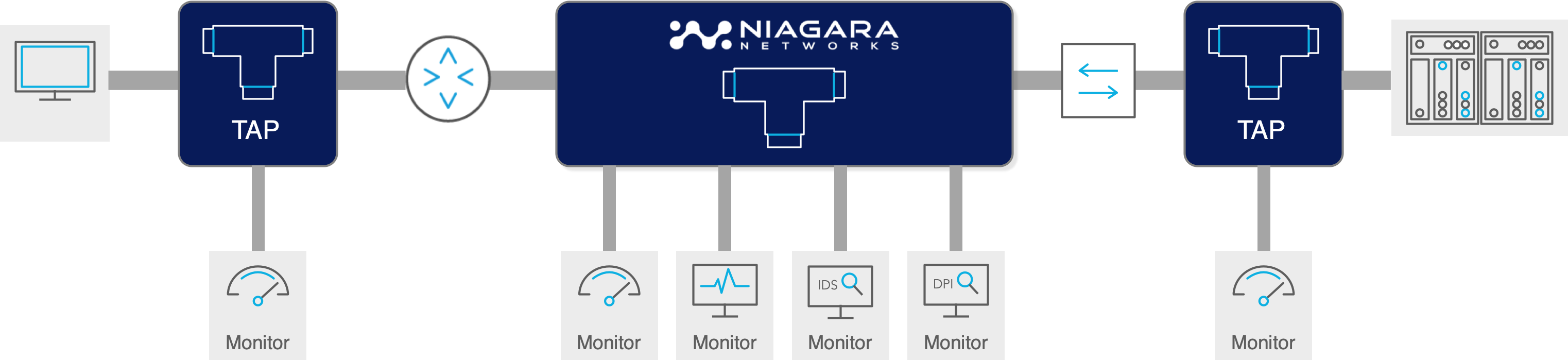
A network TAP, or Test Access Point, is a hardware device inserted into the cable path between two network devices. Production traffic passes through the TAP, while a copy of that traffic is sent to monitoring ports for packet brokers, security tools, performance tools, forensic capture systems, or observability platforms.
The value of a TAP is that traffic access is handled at the link level rather than as a best-effort switch feature. For fiber links, passive optical TAPs split the light signal. For copper Ethernet, active TAPs regenerate the electrical signal and create a monitoring copy. In both cases, the goal is the same: complete packet visibility without depending on the switch to make and prioritize monitoring copies.
• No switch resource contention for the monitoring copy.
• No hidden SPAN oversubscription during traffic bursts.
• No IP or MAC address on passive TAPs, making them invisible to the network.
• Unidirectional monitoring output that prevents tools from injecting traffic back into the production link.
• A stronger foundation for security monitoring, compliance capture, and packet forensics.

SPAN ports and port mirroring still have a place in troubleshooting, but they are not a substitute for production-grade packet visibility. A SPAN port is a software function on a switch. When the switch is busy, forwarding production traffic is the priority and mirrored traffic can be dropped or altered. A TAP is purpose-built for traffic access.
| Decision point | Use a Network TAP when... | Use SPAN when... |
|---|---|---|
| Traffic criticality | The link carries security, compliance, or incident-response traffic. |
The task is short-term troubleshooting on a lower-risk link. |
| Utilization | The link may experience sustained or bursty utilization where mirrored traffic can be dropped. | The link is low-utilization and packet loss is acceptable for the task. |
| Forensics | You need the most complete packet record possible, including traffic that software mirroring may discard. | You only need directional troubleshooting context. |
| Operational risk | You want monitoring that is independent of switch configuration changes. | A physical TAP cannot be installed in the available window. |
A passive fiber TAP, also called a passive optical TAP, uses an optical splitter to divide a portion of the light signal to a monitoring port. It requires no power and has no software configuration. Passive optical TAPs are often the best choice for critical fiber links when the optical power budget supports the chosen split ratio.
Use passive fiber TAPs for multimode and singlemode fiber links where reliability, transparency, and physical-layer capture are the priority. Confirm fiber type, speed, connector, wavelength, and power budget before ordering.
Copper Ethernet cannot be passively split like fiber. An Ethernet TAP receives the electrical signal, regenerates it, and sends traffic onward while creating a monitoring copy. Active copper TAPs are commonly used for workstation networks, management interfaces, IoT segments, OT/ICS Ethernet links, and other copper environments.
For production links, active TAPs should preserve traffic flow if power is lost. Niagara active and hybrid bypass architectures are designed around fail-safe behavior so monitoring loss does not automatically become a production outage.
A bypass TAP combines traffic access with inline tool protection. It sits around an inline security tool such as an IPS, firewall, WAF, DDoS appliance, or SSL inspection device. When the tool is healthy, traffic flows through it. If the tool fails or is taken offline, the bypass function preserves network continuity according to policy.
Some environments need more than a simple traffic copy. Niagara hybrid platforms can combine TAP access, bypass protection, filtering, load balancing, and packet broker intelligence in fewer appliances. This is especially useful when inline security, monitoring, and traffic optimization need to happen at the same point in the network.
Use this decision flow as an on-page buyer guide:
> Identify the link media. Copper Ethernet requires an active TAP. Fiber links can use passive or active TAPs. Cloud or virtual traffic may require virtual TAP visibility instead of a physical TAP.
> Determine whether an inline security tool is involved. If traffic must pass through an IPS, firewall, WAF, DDoS appliance, or SSL inspection device, use a bypass architecture.
> For fiber links, calculate the optical power budget. Choose a passive split ratio only when the power margin is sufficient for both production and monitoring paths.
> Check speed, fiber type, connector, and special optics. Multi-speed data centers, singlemode links, multimode links, and Cisco BiDi environments can require different modules.
> Decide how many tools need the traffic. If more than one tool needs the feed, route TAP output to a network packet broker instead of chaining tools from a TAP port.
| Product | Best Use Case Fit | Value Proposition |
|---|---|---|
| 3225 modular passive TAP chassis | High-density passive fiber TAP deployments across mixed fiber types and speeds. | Use one modular platform to instrument many critical fiber links and standardize packet access across the data center. |
| 3299 hybrid copper bypass | 1G/10G copper and mixed environments that need TAP, bypass, and packet broker functions together. | All-in-one solution - Reduce appliance sprawl by combining inline protection, active TAP visibility, filtering, load balancing, and aggregation. |
| 3808E hybrid bypass platform | 10G/25G/100G inline security and visibility deployments. | All-in-one - inline bypass switch, intelligent packet broker + active TAP. Protect inline tools while delivering packet visibility and traffic intelligence for demanding environments. |
| 3296 passive bypass | Optical passive bypass protection where relay-based continuity is required. |
Preserve traffic flow around inline tools and support resilient security architecture. |
| Virtual TAP | Virtualized or cloud workloads | Provides visibility into east-west and north-south traffic flows where physical TAP deployment is not possible. |
| Packet broker & bypass products with active TAP functions | Deployments where the TAP output must also be filtered, deduplicated, load balanced, or routed to multiple tools. |
Move beyond access-only TAPs and deliver the right traffic to every downstream tool. |
For production monitoring and security operations, adopt a TAP-first visibility architecture. Use Network TAPs to access traffic from critical links, optimize and distribute traffic through a Network Packet Broker, and deliver the right data to the right security and monitoring tools. Visit Niagara Networks Appliance Comparison Matrix
| Model | 1Gb | 10Gb | 25Gb | 50Gb | 100Gb | 400Gb |
| Passive Fiber | ||||||
| 3225 - Fiber | ||||||
| 3296 - Fiber/Copper | ||||||
| Active TAP | ||||||
| 3808E - Fiber | ||||||
| 3299 - Copper | ||||||
| Virtual TAP | ||||||
| Cloud Intelligence TAP |
Install TAPs during initial network build or planned cabling windows whenever possible.
Use TAPs on critical links before an incident occurs; emergency TAP installation during an investigation creates avoidable delay.
Match the TAP module to the actual media, speed, connector, wavelength, and fiber type.
Use clean, new patch cables during TAP installation and verify fiber links before production cutover.
Document split ratios, cable lengths, transceiver models, and power-budget calculations.
Send TAP output to a network packet broker when multiple tools need the same traffic.
Keep /solutions/tap-versus-span as a supporting comparison page and link to it from the SPAN section.
to provide complete, reliable access to traffic on critical physical links. Read more
Simplify provisioning and management across the entire visibility layer. Read more
Explore Network TAP Solutions
© 2026 Niagara Networks. All Rights Reserved.